Combat tracker
The Combat tracker is a room table that comes with RPG Desk: the initiative order, whose turn it is, the round and each actor’s effects. Everyone sees the tracker; only game masters change it.
Open it
Section titled “Open it”The tracker comes with every room, with nothing to enable. Open it from the room menu (right-click the room’s icon, in the bar on the left) → Tabs → Combat tracker: it opens as a tab, next to the other tables, in an empty space or in the last space you clicked. Each person opens their own, and players can open it too, to follow whose turn it is. Closing the tab erases nothing: the combat stays as it was.
Set up the combat
Section titled “Set up the combat”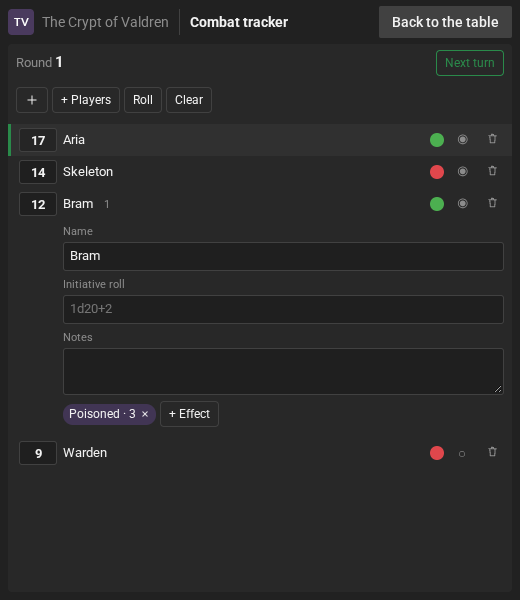
- + Players brings in all the players, each with their main character’s name.
- + (Add actor) adds a monster or NPC.
- Or, on the map, right-click a token → Add to combat: the token joins the tracker linked to it (see Link to the scene token).
- Type the initiative in the little box to the left of each one: the list sorts itself.
- Or let RPG Desk roll: open the actor (click the name), fill in the Initiative roll (
1d20+2) and click Roll, which rolls for everyone who has a roll.
Clicking the name opens the actor: Name, Initiative roll, Notes and the effects.
Run it
Section titled “Run it”- Next turn passes the turn. The chat says “▶ Aria’s turn”, and the turn is marked in the list. After the last one, the Round goes up.
- + Effect on an actor: the effect or condition’s name (“Poisoned”) and the Duration (rounds). Each round the counter goes down and, when it runs out, the chat says “Bram’s Poisoned effect has ended”. The effect’s × removes it earlier.
- Clear removes all the actors and goes back to round 1.
- The trash can icon removes an actor.
Sides and visibility
Section titled “Sides and visibility”Each actor has two buttons on the right:
- The side: each click switches between Friendly (green), Neutral and Hostile (red).
- The visibility: Visible to everyone; Visible to everyone, without notes and effects; or Visible to GMs only (the actor does not even show up for players, and its initiative roll does not go to the chat).
Link to the scene token
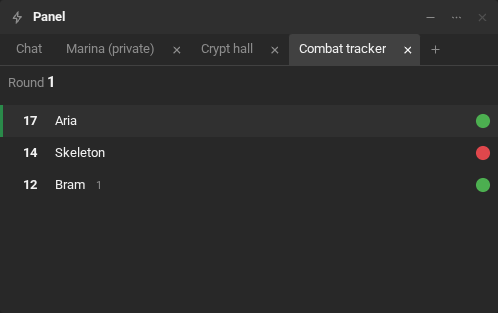
Section titled “Link to the scene token”With the tracker on, Add to combat, in a map token’s right-click menu, puts the token in the tracker linked to it. If the tracker already has an unlinked actor with the same name (a player who came in through + Players, for example), that actor is the one linked. After that, the token menu shows Already in combat.
Once linked, the actor follows the token’s Invisible condition:
- Whoever doesn’t see the invisible token doesn’t see the actor in the tracker either, and its turn does not go to the chat.
- Whoever sees the token (you, whoever controls it and the people allowed) sees the actor with the crossed-out eye next to its name.
- Without the condition, the actor shows up for everyone again.
- Visible to GMs only still wins: the actor stays with the game masters, even for those who see the token.
Opening the actor, the line Linked to a token in scene… tells which scene the token is in, and Unlink from token undoes the link.