
Chat commands
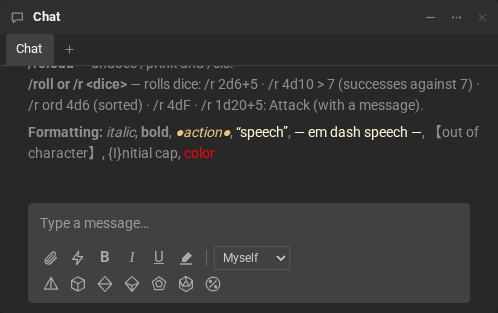
A line that starts with / is a command. Case and accents do not matter (/Roll and /roll are the
same), and the Portuguese names work too. /help shows the list in your chat:
| Command | Also | What it does |
|---|---|---|
/help |
/ajuda |
shows the commands and the chat markup, only to you |
/roll 2d6+3 |
/r, /rolar |
rolls the dice. Whatever comes after : is the roll’s name: /r 1d20+5: Attack. See Rolls |
/me raises the shield |
narrates an action, with your name (or nickname) in front: “Davi raises the shield”. Use /nick to show the character’s name |
|
/lol |
/rir |
laughs (“hahaha”); with text, the laugh is the text |
/cls |
hides what was already in your chat (only for you) | |
/fls |
shows again what /cls hid |
|
/prink |
hides system messages (who joined, who left…) from your chat, except the session clock’s | |
/reload |
undoes /prink and /cls |
|
/leave See you tomorrow! |
/partir |
leaves the room, leaving the farewell in the chat (up to 200 characters) |
/nick Raven |
changes your name in this room; /nick alone goes back to your account name |
|
/macros |
opens the macro manager |
- With Speak as → Narrator or NPC,
/megoes out with the narrator’s or the NPC’s name. - A command that does not exist answers only to you: “I don’t know the command /x. Type /help for the list.”
Macros
Section titled “Macros”Each macro becomes a command with its name: the attack macro runs with
/attack.
- The commands above come first: a macro called
rnever runs, because/ris the roll. - Among macros with the same name, the room’s wins, then yours for this room, then your global one.
- A macro can call another one, up to three levels deep.