
Integrations
A sheet or table can send data out of RPG Desk: announce a roll in a Discord channel, log XP in a spreadsheet, change the color of the room’s lights. It does so through webhooks, and only through Zapier, Make or IFTTT: the plugin chooses what it sends, and you choose where it goes.
The plugin must declare its webhooks. When you install it, the dialog lists them: “It can send data outside, through the webhooks you register later in Integrations”.
Connect a webhook
Section titled “Connect a webhook”- In the service (Zapier, Make or IFTTT), create the automation with a webhook trigger and copy its
address:
- Zapier: the “Catch Hook” trigger from Webhooks by Zapier:
https://hooks.zapier.com/hooks/catch/…; - Make: the scenario’s webhook module:
https://hook.<region>.make.com/…; - IFTTT: Webhooks:
https://maker.ifttt.com/trigger/<event>/json/with/key/<key>.
- Zapier: the “Catch Hook” trigger from Webhooks by Zapier:
- In RPG Desk, in Room settings → Plugins, click Integrations on the plugin.
- Paste the address into the webhook, choose Who can trigger it (GMs only or Everyone) and click Save.
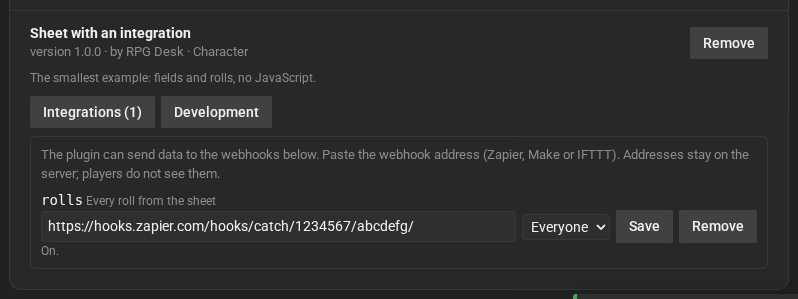
- The address stays on the server only: players do not see it, and the plugin does not choose the destination, only the webhook’s name.
- Remove turns the webhook off. Without an address, the plugin sends nothing.
- Latest sends shows what was sent, by whom, and whether it worked.
What reaches the service
Section titled “What reaches the service”Each send is a POST with JSON like this:
{ "plugin": "br.rpgdesk.example.integration", "webhook": "rolls", "room": { "id": "…", "name": "The Crypt of Valdren" }, "user": { "id": "…", "nick": "Luana" }, "sentAt": "2026-10-17T20:15:00.000Z", "data": { "total": 17 }}The plugin’s data comes in data; RPG Desk adds the rest. On IFTTT without /json in the address,
only three values go: value1 (the webhook’s name), value2 (the nickname of whoever triggered it)
and value3 (the data, as JSON).
Want your sheet to send something? See Webhooks on the sheet.